Local LLMs vs. Frontier AI: Match the Workload to the Model
When a local LLM on a Mac beats sending everything to a frontier model like Opus 4.8. The engineering, the real cost math, and how we ran 1.2 million documents this way. Private RAG, custom AI workflows, and matching each job to the right model. From a NY/NJ MSP.
Most AI advice answers the wrong question. Everyone asks which model is best. The honest answer, “whatever topped the leaderboard this week,” is also the most expensive one you can buy, and for most of the work a real business needs done, it is overkill.
The useful question is which model for which job.
A frontier model like Anthropic’s Opus 4.8 or Fable 5 is the right tool when the work is hard, and you pay for it by the token every single time. A small local LLM running on a Mac in your office costs almost nothing per request after you buy the hardware, and it never sends your data anywhere. For a lot of real work, that is all you need. The savings and the privacy come from knowing which jobs go where.
We build this for companies across NY and NJ: local LLM setups, RAG systems, and the custom workflows that tie them together. So here is the version with the sales pitch removed. What a Mac actually runs, what it costs next to the cloud, and how to use both without overpaying.
Two ways to pay for AI
Every AI cost decision comes down to one of two shapes.
Per-token, in the cloud. You call a hosted model and pay for the text going in and out. Great for low-volume, hard, or one-off work: no hardware, no upkeep, top-tier quality on tap. The problem is the bill grows with use. Loop a giant model over 200,000 documents a month and the invoice shows up every month.
The prices are not as scary as the headlines. Opus 4.8 runs about $5 per million input tokens and $25 per million output (output is the pricey half, roughly 5× input). That is a fraction of what the best model cost a year ago. Batch jobs cut it in half again, and prompt caching can knock 90% off repeated context. The cloud is not going to bankrupt you. You just have to do the math for your real volume.
Fixed cost, on your own hardware. Buy the machine once. After that, each request costs about what the electricity costs. When you have a lot of similar, not-too-hard work, this wins, and it wins fast. The ceiling is real: a small local model will not out-think a frontier model on the hard 5%, and someone has to keep the box running.
The mistake we see most is paying cloud prices for fixed-cost work, looping an expensive model over a mountain of routine files.
What a Mac actually runs in 2026
Apple Silicon has one quiet advantage that matters here: unified memory. The CPU and GPU share a single pool of fast memory, so the model’s weights sit in normal RAM instead of needing a separate, pricey GPU. A Mac with 64 GB can run a 70-billion-parameter model that would otherwise want a $1,600 graphics card. No server rack. A good Mac on a shelf.
The sizing math is easy once you know the trick, which is quantization, compressing the model to 4-bit. Figure half a gigabyte of memory per billion parameters:
- An 8B model (classification, extraction, routing): about 5 GB. Runs on almost any current Mac.
- A 70B model (solid general reasoning): about 40–43 GB. Comfortable on 48 GB or more.
- The biggest open models: an Ultra-class Mac with 192–256 GB.
Worth noting where the hardware sits right now. Apple recently trimmed its top memory option because AI data centers are eating the world’s memory supply: the M3 Ultra Mac Studio lost its 512 GB tier in early 2026 and now maxes at 256 GB. A Mac mini reaches 64 GB; the M4 Max Mac Studio, 128 GB. That tells you something about where the demand is.
Getting a model running is no longer a research project. Ollama and LM Studio do it in a few minutes, both sitting on llama.cpp with Apple’s Metal backend. For more speed there is MLX, Apple’s own framework, which runs 20–30% faster. On an M4 Max that is enough for a 70B model to read back a steady 15–20 words a second, with a small 8B model several times quicker. Faster than you can read either way.
For anyone in a regulated business, the real headline is this: nothing leaves the machine. No prompts, no files, no client data sent to anyone’s API. For a healthcare practice, a law firm, or a finance shop, that is the difference between using AI on real client files and not being allowed to touch them.
Private RAG: answers from your own documents
The most useful local-AI pattern for most businesses is RAG, retrieval-augmented generation. Skip the fine-tuning; it is expensive, brittle, and stale the day your documents change. Instead you index your documents, pull the handful of passages that match a question, and hand those to the model. It answers from your material, and it can show you which document it used.
Run it locally and the whole thing stays on hardware you own. Four parts:
- Split the documents into passages.
- A local embedding model turns each passage into a searchable vector.
- A local vector store holds them and returns the closest matches.
- A local model reads those passages and writes the answer.
Nothing goes out. That is the version of AI that survives a compliance review. It is what lets a team ask “what is our policy on X?”, “pull the indemnity clause from these contracts,” or “draft a reply from our past tickets,” with none of it leaving the building. We build this private RAG setup alongside the controls on our cybersecurity and compliance side, not as a weekend experiment.
Match the workload to the model
When we scope this for a client, every task drops into a grid and the answer falls out:
| Workload | Volume | Difficulty | Right fit |
|---|---|---|---|
| Bulk classification / tagging / extraction | High | Low–med | Local |
| Summarizing your own document archive | High | Low–med | Local |
| RAG Q&A over private or regulated data | Any | Low–med | Local (privacy) |
| Drafting routine emails and replies | High | Low | Local or mid-tier |
| Hard, novel reasoning / multi-step agentic work | Low | High | Frontier (Opus 4.8 / Fable 5) |
| Code generation or analysis you’ll act on | Low–med | High | Frontier |
| Customer-facing answers where a mistake is costly | Any | High | Frontier + guardrails |
| One-off or exploratory work | Low | Any | Frontier (no hardware to justify) |
Volume pushes you local. Difficulty pushes you to the frontier. Most businesses have a pile of the first and a little of the second, and they pay as if it were the other way around.
The cost math, with real numbers
Price out a real bulk job. Say you run 200,000 documents a quarter through an AI to categorize each one and pull a few fields. Call it 2,000 input tokens and 200 output per document. At Opus 4.8 rates:
- Input: 400M tokens × $5 = $2,000
- Output: 40M tokens × $25 = $1,000
- About $3,000 a quarter, or $1,500 as a batch job. Every quarter, forever.
The local version: one Mac, a few thousand dollars, plus electricity. Run the same job next quarter and it costs roughly nothing. An 8B or 14B model handles routine classification without complaint.
Here is the part that turns it from opinion into engineering: you do not have to choose. Run the bulk locally and send only the ambiguous or high-stakes documents to Opus 4.8 or Fable 5. If 5% are the hard ones, you are paying frontier prices for 10,000 calls instead of 200,000. (The token counts are illustrative. The per-token prices are real, and they will move. The method is what lasts.)
A real one: 1.2 million documents
A client was sitting on about 1.2 million documents they had never been able to use. The information was all in there, just scattered across a million files where nobody could see the whole picture.
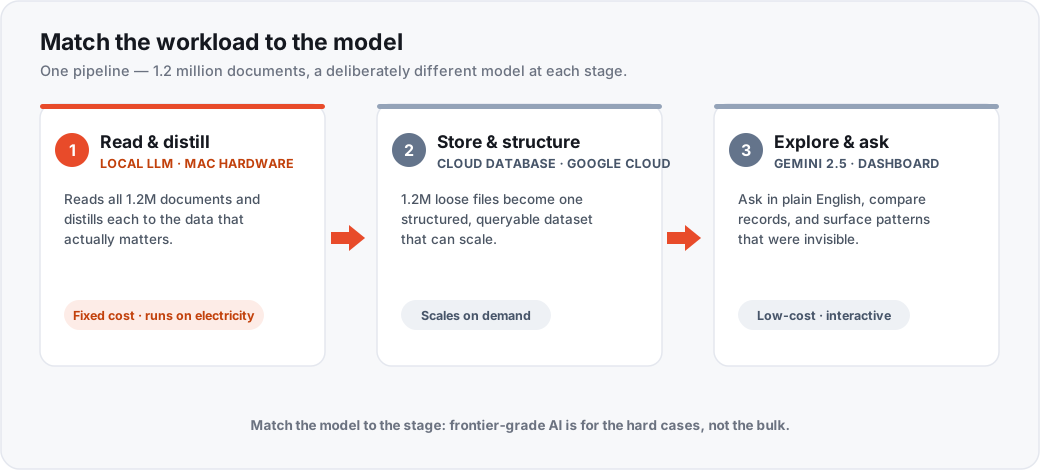
We ran it in three stages, each on a different model picked for that stage’s job:
- Read and distill, on a local model on a Mac. It read all 1.2 million documents and pulled each one down to the data that mattered. This is the stage that would have hurt on a per-token API. It is pure volume, and it never needed frontier-grade reasoning, just steady extraction a million-plus times over. Local meant the running cost was electricity, and the source files never left our hardware.
- Store and structure, on Google Cloud. The distilled output went up to a cloud database, where a million loose files became one clean dataset that could scale and back a real app.
- Explore and ask, on a low-cost Gemini 2.5 model. On top of that we built a dashboard so the client could see the data, ask it questions in plain English, compare records, and find patterns that had been invisible. Note what we did not reach for: a frontier model. The hard work was already done, so the question layer just had to be fast and cheap.
Local for the bulk, the cloud for scale, a cheap model for the questions. The client went from “the answers are in there somewhere” to actually asking.
Where local loses
We do not sell local AI as a religion. It loses in a few clear places, and ignoring them costs more than it saves:
- The hard 5%. Best reasoning, most reliable instruction-following, strongest code: the frontier models win, by the widest margin exactly where the stakes are highest. Do not run your most valuable work on an 8B model to save forty bucks.
- Upkeep. A local model is infrastructure. Someone patches the box, updates the models, and watches it. That is ongoing managed IT, which is fine when you plan for it.
- Scale. One Mac serves a team. It will not serve ten thousand people at once. That is what the cloud is for.
The rule: pay for the frontier when the work is hard, the volume is low, or a wrong answer is expensive. Pay it to tag 200,000 routine records and you are burning money.
Route, do not pick
The right setup is rarely all-local or all-cloud. It is a router that sends each job to the cheapest model that can do it well. Sometimes the routing is by stage, like the pipeline above. Sometimes it is by confidence: the local model handles everything and kicks the cases it is unsure about, plus anything flagged high-stakes, up to a frontier model. That is the structure of our defensible eDiscovery pipeline, where a local pass triages the bulk and only the hard or sensitive calls escalate. Either way you log it, so you can see where the work went and tune the line.
This is the same work as our automation builds and custom development, and it rhymes with the platform calls in our n8n vs. Make.com vs. Zapier guide and the broader where-AI-pays-back post. The model is one part of a workflow that is mostly plumbing, and the plumbing is where the reliability lives.
The point
You do not need the best model. You need the right one for each job, and a workflow smart enough to route the work. For most NY/NJ businesses that means a local LLM on a Mac doing the bulk, privately and at fixed cost, with a frontier model like Opus 4.8 or Fable 5 held back for the hard, high-stakes slice.
If your AI bill is climbing faster than the value, or you are sitting on data you would love to use but cannot send to the cloud, that is the conversation we have on a free 30-minute assessment. We will tell you what should run local, what is worth paying the frontier for, and what you do not need at all.
Written by
Founder of Sage Solutions. 20+ years in NY/NJ IT and low-voltage, Certified Ethical Hacker (CEH), and ex-FDNY. More about Jason →
Keep reading
- How-to
Windows 10 end of support: what to do with the machines you still have
Windows 10 support ended in October 2025. Here is what the paid extension actually costs a business, why the $30 consumer version does not apply to you, and how to sort the machines you have left.
Read more about Windows 10 end of support: what to do with the machines you still have - How-to
How to Clear Your Browser Cache in Chrome, Edge, Brave, Firefox, and Safari
The one keyboard shortcut that works almost everywhere, the exact menu path for each browser, what clearing the cache actually fixes, and the three problems it will not fix.
Read more about How to Clear Your Browser Cache in Chrome, Edge, Brave, Firefox, and Safari - How-to
How to Build Your First AI Workflow (Without It Going Rogue)
A step-by-step build of one real AI workflow, from picking the right process to the approval gate that keeps it from doing something expensive. What to log, what to measure, and where these break.
Read more about How to Build Your First AI Workflow (Without It Going Rogue)
Want to talk about this?
We are happy to have a 30-minute call about anything in this article — your environment, your risks, your options.